- You must set Alexa up and connect to Wi-Fi before you can put it in pairing mode for Bluetooth.
- Once done, you can use either your voice or the Alexa app to enable Bluetooth pairing mode.
Method 1: Using Voice Commands
One of the easiest ways to put an Alexa-powered Echo device in Bluetooth pairing mode is by using Alexa voice commands. This method lets you put Alexa in pairing mode without an app.
Step 1 : On your Alexa-enabled Echo device, say any of the following voice commands to Alexa:
- Alexa, Bluetooth on.
- Alexa, pair.
- Alexa, search for Bluetooth devices
- Alexa, connect to Bluetooth device.
Your Alexa device will say “searching”. That means Alexa is now looking for nearby Bluetooth devices while also being visible to other nearby devices.
Step 2 : Now, enable Bluetooth on your mobile or phone and look for available devices. Here are quick steps to enable Bluetooth on popular devices and put them in pairing mode.
- Android phone : Go to Settings > Connected devices. Tap on Pair new device.
- Samsung Galaxy phone: Go to Settings > Connections > Bluetooth.
- iPhone: Settings > Bluetooth. Enable it and look for Echo in the Other Devices section.
- Windows PC: Settings > Bluetooth & devices. Enable Bluetooth and click on Add device. Then, click on Bluetooth on the Add a Device screen. Your Echo device will show up here.
- Mac: System Settings > Bluetooth and enable it from the right sidebar. Look for the Echo device in Nearby devices, and once it shows up, hover the mouse over it and click on Connect.
Step 3: Tap/click on your Echo device on your phone or computer in the list of available Bluetooth devices to pair the two.
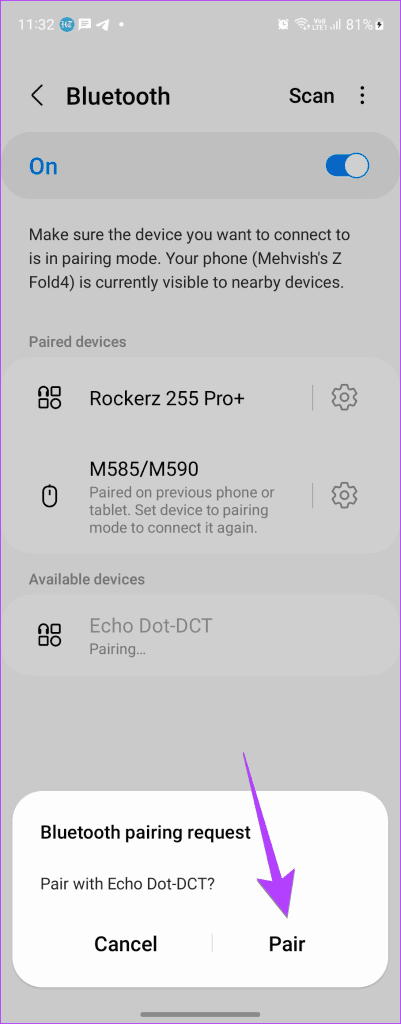
Note: Sometimes, the Echo device doesn’t show up quickly in the list of available devices on your phone or PC. You must be patient and wait for a few more seconds or try again.
That’s it. You have successfully paired your Alexa device with another device via Bluetooth.
You can also put Alexa in pairing mode manually and connect to any nearby Bluetooth device using the Alexa app. Here’s how.
Step 1 : Open the Alexa app on your phone. It’s the same app you used to set up your Alexa-enabled Echo device.
Step 2: Tap on the Devices tab at the bottom and go to Echo & Alexa . Then, tap on your Echo device from the list. Then, tap on the Connect a device option under Bluetooth Connections.

Step 3: Your Alexa device will look for nearby Bluetooth devices . Once Alexa finds a Bluetooth device, you will see its name in the app. Tap on it to connect to it . Your Echo will send a pairing request to your device. Tap on Pair to connect the two.

And that’s it. Once the pairing process is done, your Alexa will be connected to the device you chose over Bluetooth.
You need Wi-Fi to set up your Alexa device at least once. You can use your phone’s hotspot if you don’t have access to a regular Wi-Fi network.
Open the Alexa app and tap on Devices at the bottom. Go to Echo & Alexa, followed by selecting your Echo device. Tap on Bluetooth devices and select the device you want to remove. Tap on Forget Device.
