- You can pause Instagram reels or videos with a long press.
- You cannot pause Live video sessions.
- Ensure to update your Instagram app.
Fix 1: Tap to Open Videos From Feed
Fix 2: Clean Your Fingers and the Screen
If there is dust, debris, oil, or moisture on your finger or the screen, your phone may not register input. You must clean your fingers and try pausing a Reel or story again. Also, the display may not register your finger if you use your phone with gloves.
Fix 3: Force Stop Instagram
Instagram may behave weirdly at times. If the app frequently crashes or behaves abnormally on your Android phone, force-stop it and try again.
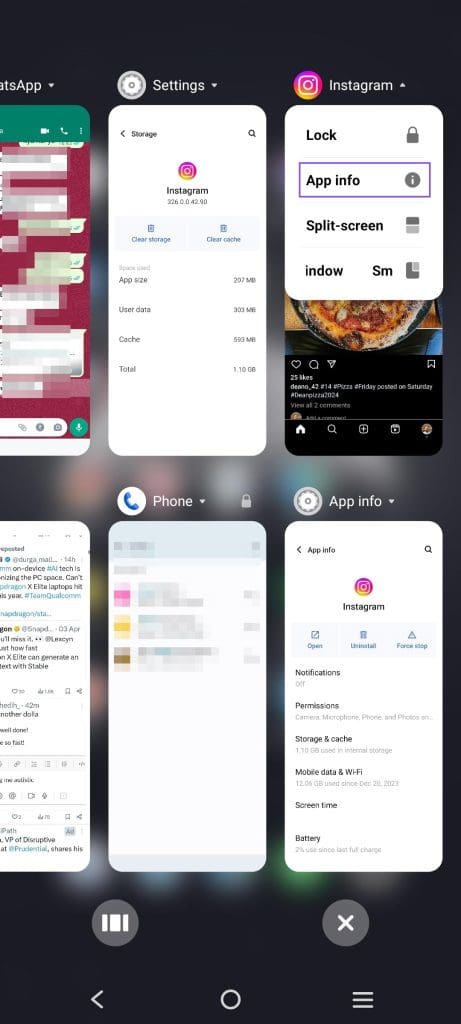
Step 1: Press the App overview button or gesture to bring up all open apps
Step 2: Find the Instagram app icon > tap on the menu > select App info .
Step 3: Tap Force stop to force close the app.
On your iPhone, swipe up to close the app or bring up the carousel of all the open apps and swipe to close it.
Fix 4: Clear Instagram Cache
Clearing the Instagram cache is another effective way to troubleshoot app irregularities. It’s a handy trick to fix common Instagram issues on the go.
Step 1: Open the Instagram app info .
Step 2: Open Storage and cache.
Step 3: Select Clear cache and reopen Instagram.

Check out the implications of clearing the Instagram cache .
Why Do My Reels Pause Instead of Mute?
It’s because you are holding it down instead of a quick tap. Repeat the same to unmute the video quickly. However, the video will get a like if you double tap trying to mute.
Why Do Some Reels Stop Playing?
This happens when you don’t have a stable internet connection. Possibly, you are moving through zones where the phone switches between the mobile tower, and the speed drops suddenly.
