- Check and ensure your iPhone supports the Apple Music Sing feature.
- Open Apple Music > relevant song > tap on the player > Lyrics icon > look for the Sing icon.
- Go to Settings > Battery > turn off the Low Power Mode toggle.
Basic Fixes:
- Update the iPhone to iOS 16.2: If you haven’t updated your iPhone to iOS 16.2, Apple Music Sing will not work. So update your iPhone to the latest iOS version or iOS 16.2 at least. Then, check again.
- Close and reopen Apple Music: If your iPhone supports Apple Music Sing but still can’t use it, you can try force quitting and relaunching Apple Music. This can help resolve any temporary issues that may arise within the Apple Music app.
- Reinstall the Apple Music app: You can uninstall the Apple Music app from your iPhone and reinstall it. Doing this will help you eliminate unknown bugs that may prevent Apple Music Sing from working on your iPhone.
Fix 1: Check if the iPhone Supports Apple Music Sing
If Apple Music Sing is not working on your iPhone, first check if your iPhone supports this feature. As of now, Apple Music Sing is only available on iPhone 11 and later or iPhone SE (3rd generation) running iOS 16.2 and later. Additionally, you must have an Apple Music subscription to use this feature.
Fix 2: Ensure the Song Supports Apple Music Sing
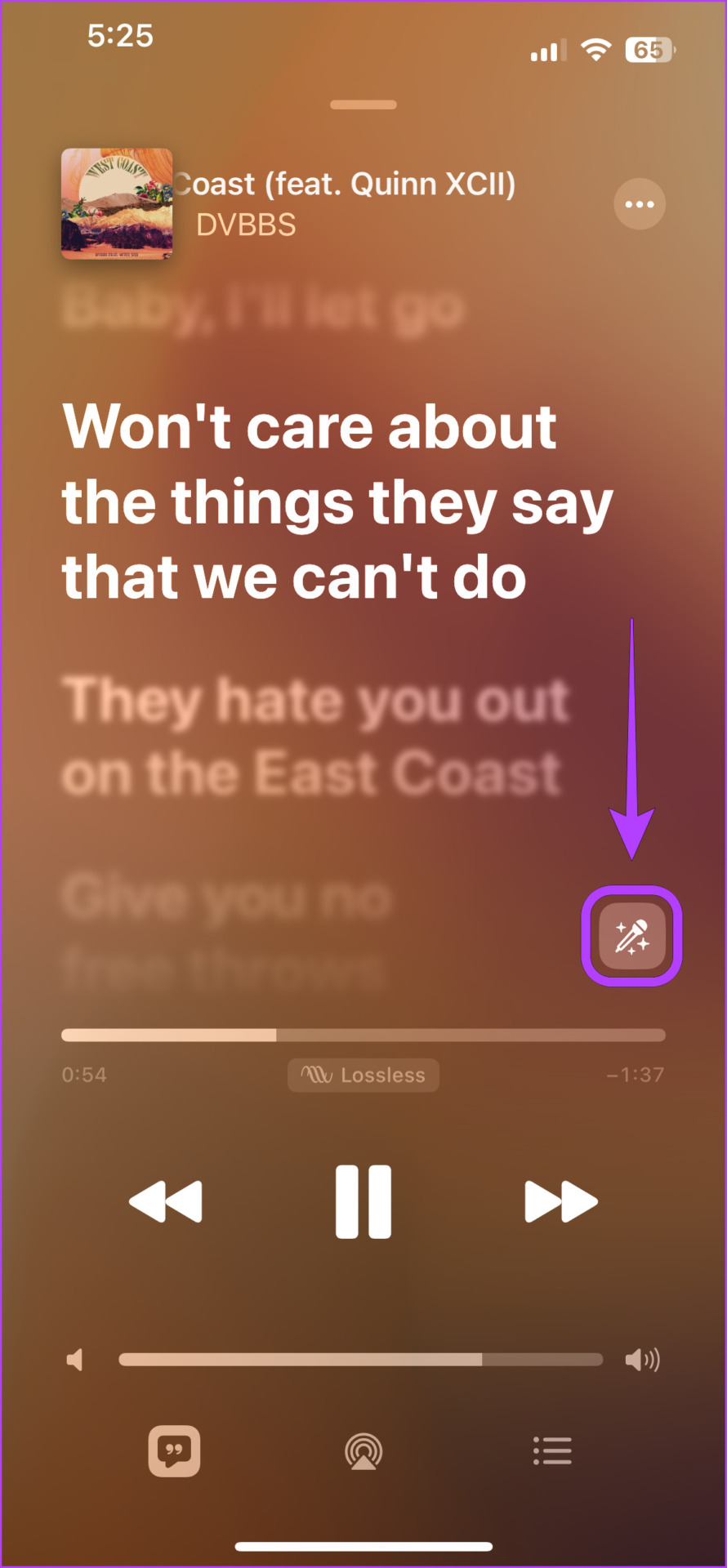
There’s a chance that the song you’re playing doesn’t support Apple Music Sing. It is a relatively new feature and not all songs support Apple Music Sing, especially ones that you might’ve synced from your iTunes library. Here’s how you can check the same.
Step 1: Open Apple Music and play the relevant song .
Step 2: Then, tap on the player to open Now Playing. Tap the Lyrics icon .

Step 3: Look for the Sing icon to check if that song supports Apple Music Sing.
Step 4: If the icon appears, tap on it to enable Sing mode .
Fix 3: Disable Low Power Mode
iOS offers a Low Power Mode to preserve your iPhone’s battery until the next charge. Once enabled, it turns off the haptics, reduces the background app usage, and might even cause Apple Music Sing to not work. So, check and ensure Low Power Mode is disabled on your iPhone using the below steps.
Step 1: Open Settings and tap on Battery . Turn off the Low Power Mode toggle.

Once done, try using Apple Music Sing to check if the issue has been fixed. You can also check out our other article if Apple Music keeps skipping or pausing songs on your iPhone .
